The T&T WX BOT is a MeshCore node in Owasso that answers questions over LoRa. You need no internet on your end — just a radio and the MeshCore app. Send it a direct message and it replies to you alone, so asking costs the channel almost nothing.
Setting up
- Add the channel. In the MeshCore app, add a channel named
#tulwx. It is a hashtag channel, so there is no key to type and nobody to ask. The 6:30 briefing and severe weather warnings arrive here. - Wait for the bot to appear. Once it is within reach,
T&T WX BOT CB-10E3shows up in your contacts on its own — it adverts periodically. That contact is what you send commands to. - Try it. Send it
wx. If a forecast comes back, you are done.
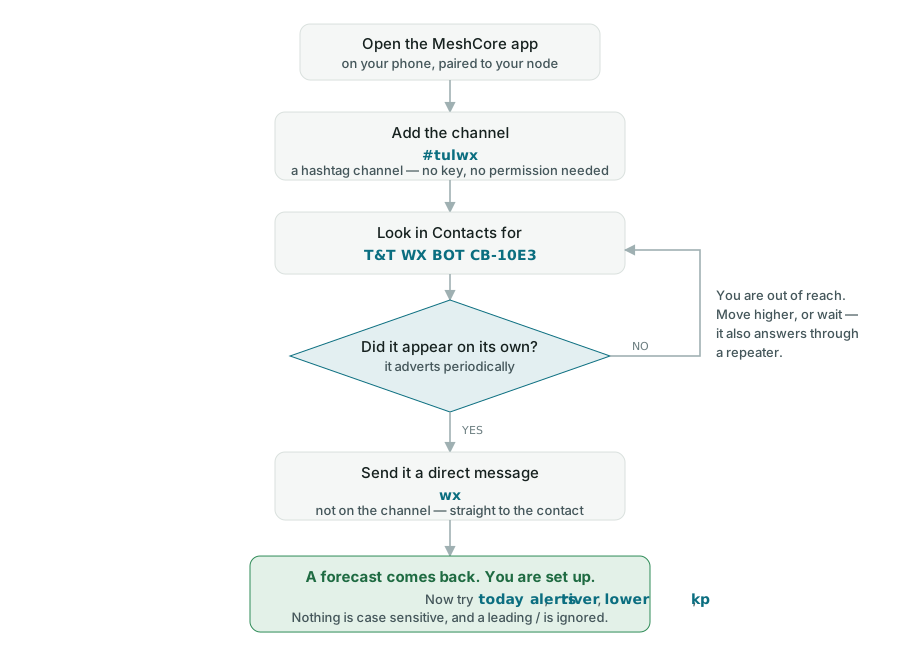
Nothing is case sensitive and a leading slash is ignored, so WX, wx and /wx all work.
Areas
Leave the area off and you get the Tulsa area. Add one of these to ask about somewhere else.
| Code | Area |
|---|---|
tul | Tulsa area |
osage | Osage County |
creek | Creek County |
delaware | Delaware County |
Weather
| Command | What it does | Example |
|---|---|---|
wx [area] | Next two forecast periods | wx osage |
wx2 [area] | Further out, four periods | wx2 creek |
today [area] | Full day for one area: highs, lows, rain timing, wind, UV | today delaware |
morning | The whole 6:30 briefing, all four counties, on demand | morning |
alerts [area] | Watches, warnings and advisories in effect now | alerts tul |
areas | Which areas the bot knows | areas |
Water, sky and fire
Live numbers pulled off public feeds the moment you ask. Nothing goes out on the channel, so ask as often as you like.
| Command | What it does | Example |
|---|---|---|
river <name> | Gauge height and flow, straight from the USGS gauge | river lower |
rivers | List the rivers and creeks it watches | rivers |
sun [area] | Sunrise, sunset, day length, moon phase | sun |
fire [area] | Red flag warnings and fire weather watches in effect | fire osage |
aqi [area] | Air quality index and fine particulates | aqi tul |
kp | Planetary K index: aurora chances and HF conditions | kp |
Rivers and creeks it watches
Short names for river. Readings come from the USGS gauge, usually within the last fifteen minutes.
| Code | Gauge |
|---|---|
ark | Arkansas River at Tulsa |
verd | Verdigris River near Claremore |
bird | Bird Creek near Owasso |
spav | Spavinaw Creek near Eucha |
ill | Illinois River near Tahlequah |
lower | Lower Illinois near Gore, below Tenkiller |
baron | Baron Fork at Eldon |
flint | Flint Creek near Kansas |
neosho | Neosho River near Langley |
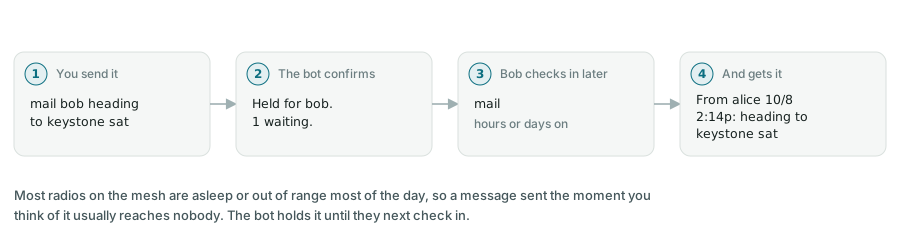
Most radios on the mesh are asleep or out of range most of the day, so a message sent the moment you think of it usually reaches nobody. The bot holds it for you instead and hands it over the next time that person checks in.
| Command | What it does | Example |
|---|---|---|
mail | Read what is waiting for you | mail |
mail <who> <text> | Send a message straight away | mail bob heading to keystone sat |
draft <who> <text> | Start a longer message you will add to | draft bob launching from walnut creek |
+ <text> | Add another line to the draft | + around 8am, bringing extra rods |
send | Send the draft | send |
abort | Throw the draft away | abort |
who | List the node names the bot knows, so you know how to address someone | who |
Writing something longer
The app cannot send more than about 150 characters at once, so build a longer note a line at a time:
draft bob heading to keystone saturday
+ launching from the walnut creek ramp around 8
+ bringing the extra rods if you need one
send
Limits
- 440 characters — the longest single piece of mail
- 10 a day — how much mail one person can send
- 7 days — how long unread mail is kept
- 15 minutes — how long an unfinished draft stays open
Mail is a postcard, not a sealed envelope. It is encrypted on the air, but it sits in plain text on the machine running the bot until it is delivered, and whoever runs that machine can read it. Fine for “running late” and trip plans. Not for anything you would mind being read.
Nets and coverage
The bot keeps a record of every packet it hears, including signal strength and how many hops it took. That record is what these read from.
| Command | What it does | Example |
|---|---|---|
stats | Last 24 hours: packets, nodes heard, loudest, farthest, busiest hour | stats |
heard | Every node heard in the last 24 hours | heard |
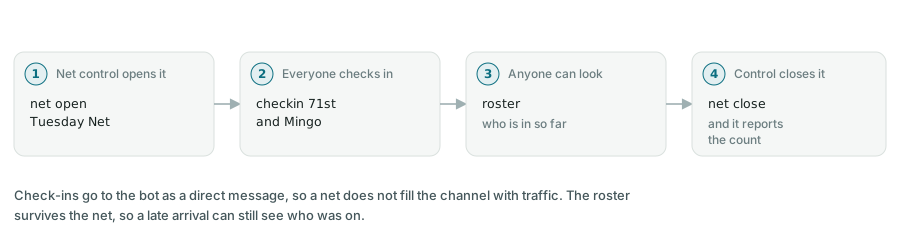
net status | Is a net running, and how many have checked in | net |
net open <name> | Open a net. Net control only, if a control list is set. | net open Tuesday Net |
net close | Close the net and report the count | net close |
checkin [note] | Check in to the running net, with an optional note | checkin 71st and Mingo, mobile |
roster | Who has checked in to this net, or the last one | roster |
Everything else
| Command | What it does |
|---|---|
help | The short command list |
mailhelp | The short mail list |
meshhelp | The short net and stats list |
ping | Check the bot is alive |
If it does not answer
- Send
ping. A reply means the bot is fine and the problem is whatever you sent it. - No reply at all usually means you are out of reach, not blocked. The bot answers anything it can hear, including through a repeater, so try again from higher ground or nearer a window.
- If the bot seems slow rather than silent, that is deliberate — it spaces its replies out so they do not collide with other traffic.
Being a good neighbour
- Every command above is a direct message, so it answers only you and barely touches the channel. Ask away.
- The channel itself stays quiet on purpose: the 6:30 forecast and severe weather warnings, nothing else.
- Air time is shared by everyone on the mesh. A bot that chatters costs every other node.
About this bot
Run by ChatterBack at Owasso, on 910.525 MHz, 62.5 kHz, SF7, CR5. Questions, or a node name you want added, go to the #tulwx channel.